힘과 위치에 대한 기초 튜토리얼
이 가이드에서는 힘을 가하고 커서의 이동을 시각화하는 간단한 데모를 소개합니다. Inverse3 마지막에는 Inverse3 가상 고무줄에 의해 시작 위치에 고정된 듯한 느낌을 시뮬레이션하고, 구형 GameObject가 커서의 위치를 표시합니다.
소개
‘시작하기’ 가이드에서는 이 객체 Inverse3, 그 기능 및 일정한 힘을 생성하는 방법을 소개했습니다. 여기서 우리의 목표는 커서에 고무줄 효과를 시뮬레이션하는 것입니다. 고무줄은 스프링과 유사하게 작동합니다. 즉, 그 힘은 강성과 양 끝점 사이의 거리에 따라 결정됩니다. 따라서 우리는 위치와 강성을 입력으로 받아, 커서가 원점으로부터 멀어지는 것을 막는 힘을 생성하는 함수를 설계하고자 합니다.
장면 설정
먼저 ‘GameObjects > Haply ’ 메뉴를 통해 Haptic Rig(한 손용) 을 생성하세요.
ForceAndPosition 구성 요소
GameObject를 선택하세요 햅틱 오리진 그리고 다음과 같은 이름의 새 스크립트를 추가하고 ForceAndPosition.cs, 그런 다음 클래스를 채우세요 ForceAndPosition 다음 코드를 사용하여:
[SerializeField]
private Inverse3 inverse3 = null;

[SerializeField, Range(0, 400)]
private float stiffness = 100;

private void OnDeviceStateChanged(object sender, Inverse3EventArgs args)
{
    var inverse3 = args.DeviceController;

    // Calculate the force.
    var force = (inverse3.WorkspaceCenterLocalPosition - inverse3.CursorLocalPosition) * stiffness;

    // Apply the force to the cursor.
    inverse3.SetCursorLocalForce(force);
}
이 구간은 강성을 100 뉴턴/미터(N/m)로 설정하여, 비교적 유연한 스프링을 시뮬레이션합니다.
또한 이 구간은 inverse3.WorkspaceCenterLocalPosition, 작업 영역의 중심을 반환하는 속성입니다.
이 메서드는 커서 위치를 작업 영역의 중심에서 빼서 힘을 계산한 다음, 그 결과에 강성을 곱합니다.
마지막으로, 이 힘은 다음을 사용하여 커서에 적용됩니다. inverse3.SetCursorLocalForce.
알림 기능을 통합하세요 OnDeviceStateChanged 방법론에서 OnEnable et OnDisable, 다음에서 설명된 바와 같이 가이드: 시작하기 :
protected void OnEnable()
{
    inverse3.DeviceStateChanged += OnDeviceStateChanged;
}

protected void OnDisable()
{
    inverse3.DeviceStateChanged -= OnDeviceStateChanged;
}
게임 플레이
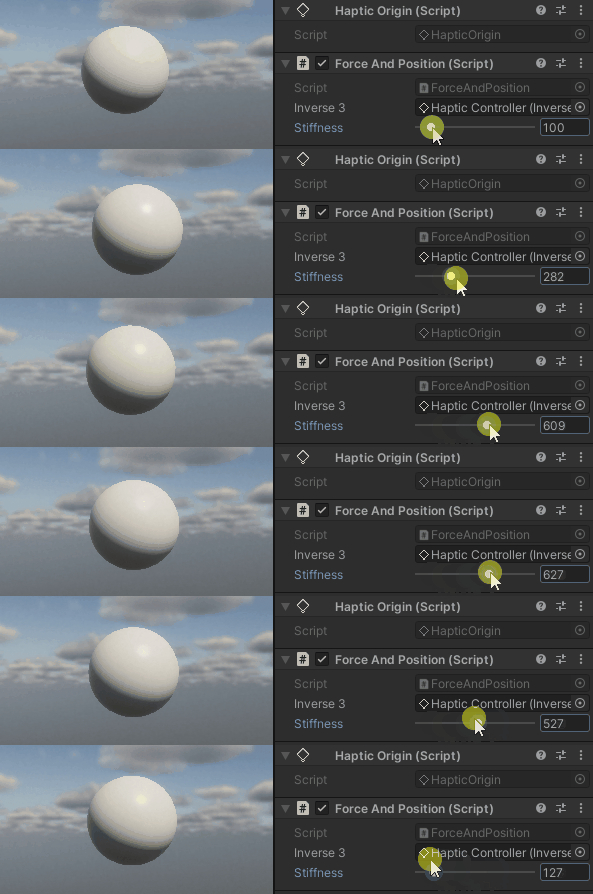
Inverse3 의 커서를 잡고, 재생 모드를 켠 다음 장치를 조작해 보세요. 커서를 움직이면 힘이 발생한다는 것을 알 수 있을 것입니다. 커서가 시작 위치에서 멀어질수록 이 힘은 더욱 강해집니다.
소스 파일
이 예제에서 사용된 최종 씬과 관련 파일들은 모두 Unity 패키지 관리자의 ‘Tutorials’ 예제에서 가져올 수 있습니다.
ForceAndPosition.cs
/*
 * Copyright 2024 Haply Robotics Inc. All rights reserved.
 */

using Haply.Inverse.DeviceControllers;
using Haply.Inverse.DeviceData;
using UnityEngine;

namespace Haply.Samples.Tutorials._1_ForceAndPosition
{
    /// <summary>
    /// Demonstrates the application of force to maintain the cursor at its center position.
    /// </summary>
    public class ForceAndPosition : MonoBehaviour
    {
        public Inverse3Controller inverse3;

        [Range(0, 400)]
        // Stiffness of the force feedback.
        public float stiffness = 100;

        private void Awake()
        {
            inverse3 ??= FindObjectOfType<Inverse3Controller>();
        }

        /// <summary>
        /// Subscribes to the DeviceStateChanged event when the component is enabled.
        /// </summary>
        protected void OnEnable()
        {
            inverse3.DeviceStateChanged += OnDeviceStateChanged;
        }

        /// <summary>
        /// Unsubscribes from the DeviceStateChanged event and reset the force when the component is disabled.
        /// </summary>
        protected void OnDisable()
        {
            inverse3.DeviceStateChanged -= OnDeviceStateChanged;
            inverse3.Release();
        }

        /// <summary>
        /// Event handler that calculates and send the force to the device when the cursor's position changes.
        /// </summary>
        /// <param name="sender">The Inverse3 data object.</param>
        /// <param name="args">The event arguments containing the device data.</param>
        private void OnDeviceStateChanged(object sender, Inverse3EventArgs args)
        {
            var inverse3 = args.DeviceController;

            // Calculate the force.
            var force = (inverse3.WorkspaceCenterLocalPosition - inverse3.CursorLocalPosition) * stiffness;

            // Apply the force to the cursor.
            inverse3.SetCursorLocalForce(force);
        }
    }
}